The Algarve is Portugal's southern coast, 150 kilometres of it, from the surf beaches below the Spanish-facing Sotavento in the east to the wild cliffs of the Costa Vicentina in the west. It has around 300 days of sun a year, the warmest sea in mainland Portugal, and it is the region most foreigners picture when they picture moving to Portugal.
It is also not one place. “The Algarve” is 16 municipalities, and the difference between them is larger than most guides admit. A square metre in Loulé costs more than three times a square metre in Alcoutim. A beach town heaving in August is half-empty in January. The right answer depends entirely on which Algarve you mean.
This guide is organised by place rather than by topic, because that is how the decision actually gets made. It uses the prices registered with the tax authority, covers the seasonal tourist tax and the water question that older articles get wrong, and sets out where to base yourself and what each stretch of coast is for.
Key Takeaways: Exploring the Algarve in Six Steps
- Stop thinking of it as one market. Registered prices run from around 1,200 euros per square metre in the interior east to nearly 4,000 in Loulé and Lagos. Pick the municipality before anything else, because the regional average hides a threefold spread.
- Decide east, central or west. The Sotavento (east: Tavira, Olhão, Vila Real) is quieter, cheaper and closer to Spain. The central strip (Albufeira, Loulé, Vilamoura, the Golden Triangle) is the busiest and priciest. The Barlavento and west (Lagos, the Costa Vicentina) is dramatic coast and surf. They are different lifestyles at different prices.
- Separate registered prices from asking prices. Portal averages sit above what actually gets signed at the notary, and Statistics Portugal publishes the registered median for every one of the 16 municipalities.
- Watch the seasonal trap in renting. Many Algarve landlords only offer short-term summer lets, because holiday lets pay more. Genuine year-round long-term contracts are scarcer than in the cities and worth locking in early.
- Buy with someone who knows the town and can act while you are away. Most Algarve buyers are not in Portugal when they start, and the price gap between towns and the quality gap between coastal and inland stock is wide. Ola Estate covers the Algarve, searches the whole market rather than one agency's listings, represents the buyer, reviews every contract, and can handle a fully remote purchase through power of attorney.
- Check the current facts, not the old ones. The tourist tax became seasonal in 2026, and the Algarve's reservoirs went from a drought emergency to full over one wet winter. Guides written in 2023 to 2025 get both wrong.
The Algarve at a Glance
The Algarve was the second most expensive region in Portugal to buy a home in 2025, behind only Greater Lisbon, at a registered median of 3,139 euros per square metre against a national 2,076. It is a region built on tourism and, increasingly, on foreign residents, which is the root of both its prosperity and its housing pressure.
The Three Algarves
Before the numbers, the geography, because it determines everything else. The coast divides into three, and locals talk in these terms.
Sotavento: the eastern Algarve
From Faro east to the Spanish border: Olhão, Tavira, Vila Real de Santo António, Castro Marim, and inland Alcoutim. This is the calmer, more Portuguese Algarve, with warmer, flatter water sheltered by the Ria Formosa lagoon and its barrier islands. Tavira is the jewel, a proper working town rather than a resort. Prices are lower than the centre, the pace is slower, and Seville is 90 minutes away.
The central Algarve
Faro, Loulé, Albufeira, and the resort belt: Vilamoura, Quarteira, and the Golden Triangle of Almancil, Quinta do Lago and Vale do Lobo. This is the busiest, most developed and most expensive stretch, with the big beaches, the golf, the marinas and the nightlife of Albufeira. It is also where the airport, the best hospitals and the most services are. If you want convenience and an international scene, it is here, at a price.
Barlavento and the west
From Portimão and Lagoa west through Lagos to the end of the land at Sagres, then up the wild Atlantic Costa Vicentina through Aljezur. Lagos is the anchor: a historic town with a marina and superb beaches that has become a favourite with younger expats and remote workers. The further west you go, the more dramatic and undeveloped the coast, the better the surf, and the cooler and windier it gets. Monchique, in the hills behind, is a different world of forest and spa water.
What Property Costs in the Algarve
The registered numbers, municipality by municipality
This is the table almost no guide publishes, and it is the one that matters. These are registered medians declared to the tax authority and published by Statistics Portugal, covering the 12 months to the fourth quarter of 2025, the most recent municipality-level figures at time of writing. They are lower and more reliable than the asking prices on property portals.
A note on this table. Statistics Portugal names Loulé (3,993), Lagos (3,801), Faro and Albufeira among the highest registered municipalities and Alcoutim (1,188) as the lowest, all from the fourth quarter 2025 release. For the municipalities INE does not name individually each quarter, the figures shown are current portal asking-price medians and are flagged as such; treat them as upper bounds on what actually gets signed.
The headline is the spread. Loulé is more than three times Alcoutim. Two Algarve municipalities, Loulé and Lagos, sit among the five most expensive in the entire country, alongside Lisbon, Cascais and Oeiras. And yet seven of the sixteen municipalities still had average sale prices below 3,000 euros per square metre in late 2025. The Algarve contains both some of Portugal's priciest property and genuine value, sometimes 20 minutes apart.
Where the extremes are
- The Golden Triangle (Quinta do Lago, Vale do Lobo, Almancil, in Loulé municipality) is the luxury market, where villas run into the millions and seafront or golf-front property reaches 5,000 to 9,000 euros per square metre and beyond. It behaves like a separate market from the rest of the region.
- Lagos and Loulé lead the mainstream coastal market, combining beaches, services and international demand.
- The interior (Monchique, Silves, São Brás de Alportel, and above all Alcoutim) is where the value is, for buyers who want space, quiet and a garden over a beach ten minutes away. Prices there rose fastest in percentage terms in 2025, off a low base, as buyers priced out of the coast moved inland.
Who is buying
The Algarve has the heaviest concentration of foreign buyers in Portugal. Across the region, buyers with a foreign tax domicile consistently pay more per square metre than domestic buyers, both because of what they buy and where. British, Irish, German, Dutch, French and, increasingly, American buyers dominate the coastal second-home and retirement market. This is the double edge of the Algarve: foreign demand is what built the region's prosperity and what has pushed coastal prices beyond the reach of many local wages.
What you pay on top of the price
The advertised price is not the total. Budget separately for IMT (the transfer tax, on a sliding scale), stamp duty at 0.8%, notary and registry fees, legal review, and mortgage costs if borrowing. You will need a Portuguese tax number before signing the promissory contract. Because so many Algarve buyers are abroad, it is worth knowing that the whole purchase can be completed remotely through a power of attorney. We cover the transfer tax bands, the non-resident mortgage process and remote purchase in separate guides.
Two Algarve-specific cost points. First, if you are buying a villa, the running costs of a pool and a garden in a hot dry climate are real: budget for maintenance, and factor in water. Second, many coastal properties are held through structures or come with holiday-let histories, so the due diligence differs from a simple city flat.
Renting in the Algarve, and the Seasonal Trap
The official numbers
The Algarve's median rent on new contracts was 10.53 euros per square metre in 2025, above the national median, and the region accounted for 5.6% of all new contracts in the country. In the first quarter of 2026 the regional new-contract median was 10.71 euros per square metre, third highest of any region after Greater Lisbon and Madeira.
Rough monthly rents in the popular towns, from listing data, for a one-bedroom flat:
The seasonal trap
This is the single most important thing to understand about renting in the Algarve, and it barely features in most guides.
A large share of Algarve property earns its keep as holiday accommodation. A landlord can make more from a flat let by the week in July and August than from a twelve-month contract, so many will only offer short-term or seasonal lets, or will offer a “long-term” contract that quietly ends before the summer season. Genuine year-round rentals are scarcer than in Lisbon or Porto, and they get taken quickly, especially in the desirable coastal towns.
The practical consequences:
- Start looking early and be ready to commit. Autumn and winter are the best windows, when summer lets end and landlords want a tenant through the quiet months.
- Read the contract's duration and renewal terms carefully. Confirm it is a genuine residential lease, registered with the Tax Authority, not a disguised seasonal let.
- Consider basing yourself in Faro, which has the deepest year-round rental market because it is a working city rather than a resort.
- Inland towns have more year-round supply and lower prices than the coast.
The 2026 rental law changes apply here as everywhere: the 2% cap on new contracts was repealed, existing contracts follow the 2.24% annual coefficient, and tenants can deduct up to 900 euros of rent against income tax where the lease qualifies and is registered. We have a separate guide on renting long-term as a foreigner and the documents you will need.
Cost of Living in the Algarve in 2026
The Algarve sits in the middle of the Portuguese cost map: cheaper than northern and western Europe, more expensive than most of inland Portugal, and with a wide internal range driven almost entirely by how close to the coast and the tourist hotspots you live. The ranges below are working estimates and assume you cook most days and live year-round rather than in peak season.
The things that are different here
- You will probably need a car. Public transport between Algarve towns is thin and slow, and the train line, while scenic, is limited. Away from central Faro, a car is close to essential, which adds fuel, insurance and maintenance to the budget.
- Prices swing with the season. Restaurants, markets and services in tourist towns charge more in summer, and some close entirely in winter. Year-round residents learn where the locals eat.
- Utilities and pool costs. Air conditioning in summer and a pool, if you have one, add to bills. Water is metered and, as below, a resource to respect.
- Healthcare is good and getting better. Legal residents can use the national health service, and the region has both public hospitals (Faro, Portimão) and a growing private sector. Many residents carry inexpensive private insurance for speed.
For income context: the national minimum wage in 2026 is 920 euros gross a month, netting 818.80, and the average monthly wage was 1,694 euros in 2025. The Algarve's own economy is tourism-heavy and seasonal, so local year-round salaries are modest and many foreign residents live on remote income or pensions rather than local jobs.
The Water Question, Answered Properly
If you read anything about the Algarve written between 2023 and 2025, you will have seen that the region was running out of water. That was true then. It is not the situation now, and the reversal is dramatic enough that it deserves its own section.
Through 2023 and into 2024 the Algarve was in severe drought. The Bravura reservoir near Lagos fell to around 10% of capacity and was regularly among the emptiest in the country. The government imposed real restrictions: cuts of 10% on urban consumption and up to 13% on agriculture and tourism against 2019 levels.
Then the weather turned. The winters of 2024/25 and especially 2025/26 brought a run of major storms. By early 2026 the same Bravura reservoir that had nearly run dry was full and carrying out controlled discharges to protect the dam. Across the region the six main reservoirs recovered to a comfortable level, and the government relaxed restrictions to a light 5% precautionary cut across all sectors.
The honest, current position is this:
- Right now there is no water crisis. Reservoirs are full or near full after the wet winters, and the only restriction is a modest precautionary one.
- The structural risk is real and permanent. The Algarve is the driest region in Portugal and the most exposed to climate variability. Water managers are actively planning for resilience, including diversifying sources, cutting network losses, reusing treated water for golf courses and green spaces, and a planned desalination plant. Wet years buy time; they do not end the problem.
- For a resident, the message is simple. The taps are not about to run dry, but the Algarve is a place to use water thoughtfully, and a garden of lawn and thirsty plants is a choice with a cost. Drought-tolerant planting is the sensible default.
Where to Base Yourself: Town by Town
If you want convenience
Faro is the practical choice and the one most guides underrate. It is a real city, not a resort: the airport, the region's main hospital, the university, a walkable historic centre, and by far the deepest year-round rental market. It is less pretty than Tavira and less fashionable than Lagos, and it is where daily life actually works.
If you want a beautiful town
Tavira in the east and Lagos in the west are the two most loved towns in the region, for different reasons. Tavira is graceful, historic and calm, with a river running through it and the Ria Formosa islands offshore; it draws an older, quieter crowd. Lagos is livelier and younger, with a marina, a walled old town, a strong remote-work scene and the most spectacular beaches on the south coast. Both cost more than the average.
If you want value
Go inland or east. Silves, São Brás de Alportel and Monchique give you space, quiet and much lower prices for accepting that the beach is a drive rather than a walk. In the east, Olhão is a working fishing town with a superb market and a fraction of the polish and price of the resorts, and it has become a genuine favourite with people who want the real thing. Vila Real de Santo António and Castro Marim, on the border, are the cheapest coast.
If you want the resort life
Albufeira for beaches and nightlife, Vilamoura for the marina and golf, and the Golden Triangle for luxury villas and the best golf courses in the country. These are the most international, most expensive and most seasonal parts of the region, busy in summer and much quieter in winter.
Getting Around the Algarve
This is where the Algarve differs most from the cities: there is no metro, and public transport is limited.
- The train runs along the coast from Lagos in the west through Portimão, Albufeira, Faro and Tavira to Vila Real de Santo António. It is scenic and cheap but slow and infrequent, and many stations are inconveniently far from the town centres they serve.
- Buses connect the towns but are geared to residents and workers rather than convenience, with sparse timetables outside the main routes.
- A car is close to essential for most people living here, particularly outside Faro and for anywhere inland or off the main coast road. The A22 motorway (the Via do Infante) runs the length of the region and is tolled electronically.
- Faro Airport is the gateway, with heavy seasonal traffic from the UK, Ireland, Germany, the Netherlands and Scandinavia, and growing year-round and North American service. As across the EU, the Entry/Exit System became fully operational on 10 April 2026, so non-EU short-stay travellers now have biometric records taken instead of a passport stamp; ETIAS, the separate pre-travel authorisation, is expected later in 2026. Faro's passport queues in peak summer are a known pain point.
What to See and Do
The beaches
The reason most people come. The character changes as you move west:
- East (Sotavento): the barrier islands of the Ria Formosa, reached by boat from Faro, Olhão and Tavira. Long flat sandbars, warm calm water, and Ilha da Barreta (Deserted Island), Ilha da Culatra and Ilha de Tavira among them.
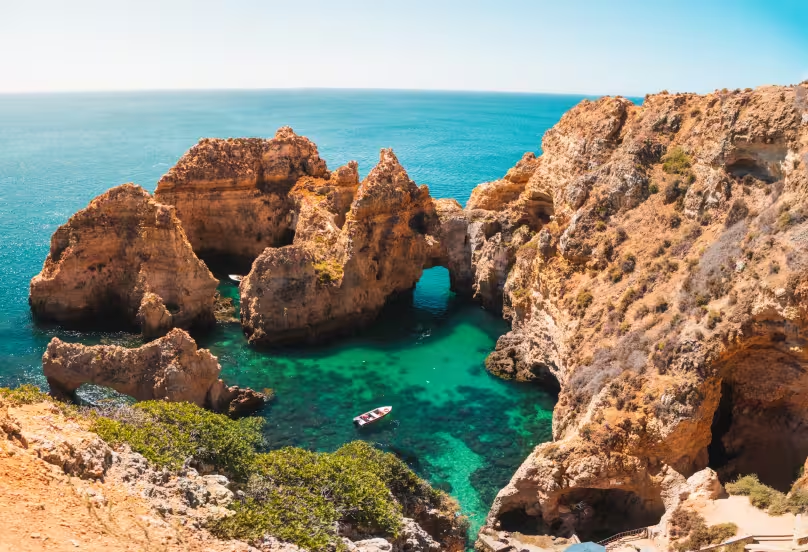
- Central: the classic postcard cove beaches around Albufeira, Carvoeiro and Lagoa, framed by golden cliffs. Praia da Marinha is one of the most photographed beaches in Europe.
- West (Barlavento): the dramatic cliff-backed beaches around Lagos, Dona Ana and Praia do Camilo, and the wide sweep of Meia Praia.
- The wild west (Costa Vicentina): Atlantic surf beaches from Sagres up through Aljezur, cooler, windier and far less developed, protected within a natural park.
Beyond the beach
- The Ria Formosa Natural Park, the lagoon system stretching 60 km along the east coast, for birdwatching, boat trips and the islands.
- Cape St Vincent (Cabo de São Vicente) at Sagres, the south-western tip of Europe, where the cliffs meet the ocean and the sunsets are famous.
- Silves, the Moorish capital of the Algarve, with a red sandstone castle above an orange-growing valley.
- Tavira, for the old town, the churches, the Roman bridge and the island offshore.
- Benagil, the sea cave reached by boat or kayak, spectacular and very crowded; go early or off-season.
- Monchique and Fóia, the highest point in the Algarve, for forest, spa water and cool air in the heat of summer.
- Golf. The Algarve is one of Europe's premier golf destinations, with the Golden Triangle courses (Quinta do Lago, San Lorenzo, Vale do Lobo) at the top end and dozens more across the region.
Food and markets
The Algarve eats from the sea. Grilled fish and cataplana (a seafood stew cooked in a copper pan), clams, and the tuna traditions of the east. Inland, the food turns to pork, game and the black pig. The markets are the heart of each town: Olhão's waterfront market is the region's best, and Loulé's covered market a landmark. Local wines from the interior are improving, and the medronho, a fiery spirit from the arbutus berry, is the mountain drink of Monchique.
What Changed in the Algarve in 2026
- The tourist tax became seasonal. Several municipalities, including Albufeira, Lagoa, Portimão, Olhão and Vila Real de Santo António, moved to roughly 2 euros a night in high season and 1 euro in low season, replacing the old flat rates. Only about seven of the sixteen municipalities charge the tax at all. Age exemptions vary by town, so check where you are staying.
- The water crisis reversed. After the wettest winters in years, reservoirs went from near-empty to full and spilling, and restrictions eased to a light 5% precaution. The structural risk remains, but the emergency has passed.
- Registered prices crossed new thresholds. The region passed a registered median of 3,139 euros per square metre for 2025, second only to Greater Lisbon, with Loulé and Lagos among the five priciest municipalities in the country.
- The national rental law was reformed. The 2% cap on new contracts was repealed and the tenant rent tax deduction was introduced, both applying in the Algarve as elsewhere.
- Border procedures changed at Faro. The EU Entry/Exit System went fully live on 10 April 2026, with biometric checks replacing passport stamps for non-EU visitors.
Things People Get Wrong About the Algarve
- That it is one market with one price. Registered prices range from about 1,200 to nearly 4,000 euros per square metre depending on the municipality.
- That it is running out of water. It was, in 2023 and 2024. After two wet winters the reservoirs are full, though the long-term risk is real.
- That you can rent long-term as easily as in a city. The seasonal-let economy makes genuine year-round rentals scarcer, especially on the coast.
- That it is all resorts. Faro is a working city, Olhão a fishing town, Tavira a historic one, and the interior is empty and cheap. The resort strip is only one part.
- That you can manage without a car. Outside central Faro, you generally cannot.
- That it is only good in summer. The winters are mild and sunny and the region is at its best in spring and autumn. Some resort businesses do close in winter, though.
- That you can skip the tax number. You need a NIF before you can rent, buy, open a bank account or set up utilities.
Frequently Asked Questions
Is the Algarve expensive?
It depends entirely where. It was Portugal's second most expensive region to buy in 2025, at a registered median of 3,139 euros per square metre, with Loulé and Lagos among the priciest municipalities in the country. But seven of the sixteen municipalities were still below 3,000 euros per square metre, and the interior is far cheaper. Daily costs are moderate and swing with the tourist season.
Where is the cheapest place to live in the Algarve?
The interior and the far east. Alcoutim is the cheapest municipality by a wide margin at a registered median of 1,188 euros per square metre. Monchique, Silves, São Brás de Alportel and, on the coast, Vila Real de Santo António and Olhão offer better value than the central resort strip.
Where is the best place to live in the Algarve?
For practical year-round living, Faro. For a beautiful calm town, Tavira in the east. For an active, international, beach-focused life, Lagos in the west. For value and authenticity, Olhão or the interior. For resort living and golf, Vilamoura and the Golden Triangle. There is no single answer, which is the point.
How much does it cost to live in the Algarve?
A single person renting a one-bedroom flat needs roughly 1,600 to 2,300 euros a month year-round. A couple needs 2,200 to 3,100. A family of four needs 3,000 to 4,300. A car pushes these up relative to the cities, and living in a coastal hotspot costs more than inland.
Can foreigners buy property in the Algarve?
Yes, with no restriction by nationality or residency, and the Algarve has the highest concentration of foreign buyers in Portugal. You need a Portuguese tax number, and non-residents face different transfer tax treatment and stricter mortgage terms. The purchase can be completed remotely through a power of attorney if you are not in the country.
Is there really a water shortage in the Algarve?
Not currently. After severe drought in 2023 and 2024, two wet winters filled the reservoirs, which were full and discharging by early 2026, and restrictions eased to a light precaution. The Algarve remains the driest region in Portugal, so water resilience is a permanent long-term issue, but there is no shortage right now.
Do you need a car in the Algarve?
For most people, yes. Public transport between towns is limited and slow, and only central Faro is comfortable without a car. Anywhere inland, off the main coast road, or in a villa outside a town centre effectively requires one.
What is the Algarve like in winter?
Mild, sunny and quiet. Daytime temperatures are commonly in the high teens, the crowds are gone, and it is a favourite with retirees and remote workers who avoid the summer. The trade-off is that some resort restaurants and services close for the low season.
Which airport serves the Algarve?
Faro Airport serves the whole region, with heavy seasonal traffic from the UK, Ireland, Germany, the Netherlands and Scandinavia, and growing year-round and transatlantic routes. It is central, so most of the region is within about an hour's drive.
Is the Algarve good for families or just retirees?
Both. It has a long-established retiree community, but Lagos, Faro and the central towns also have international schools, year-round communities and a growing population of younger remote-working families. The season and the town shape the experience more than age does.
Finding a Home in the Algarve
The Algarve rewards people who know which of its many markets they are actually in. A regional average tells you almost nothing when Loulé is three times Alcoutim, when the coast and the interior are different worlds, and when a “long-term” rental can turn out to end in June.
Ola Estate works across the Algarve, from Lagos and the west through the central strip to Tavira and the east, in English, Portuguese and Russian. We search the whole market rather than one agency's listings, represent the buyer or the tenant rather than the seller, review every contract before you sign, and, because most Algarve buyers start from abroad, can run the entire purchase remotely through a power of attorney, with video tours so you can choose with confidence before you fly.
Tell us your budget, which stretch of coast you have in mind and what you need from the area, and we will come back with a shortlist that fits.
[[banner:w-image-1]]
headline: Planning your move to Portugal?
description: Start your property search before you arrive
button: Get free consultation
modal: modal-form-main
Image: https://cdn.prod.website-files.com/699c52fd0ea2d4bb2148d179/6a6cacc5593dfb415fa08c37_1BAE0548-EBDC-4A1F-9287-76BA077DD6E9.avif
color: orange
[[/banner]]
Table of content
Узнайте больше о других регионах
Еще больше практических руководств и информации о местных особенностях
Porto
Find your dream home in Porto with our expert team. We handle every detail, so you don’t have to.
Coimbra
Let our Coimbra experts guide you. We’ll be with you every step of the way, advocating for your best interests.